Models Empower PromptQL to Understand Your Data
Introduction
Models are foundational components that enable PromptQL to accurately access and interact with your data. They represent entities or collections in your data sources, including tables, views, collections, and native queries, providing the semantic understanding PromptQL needs to generate precise query plans and produce meaningful insights from your data.
Lifecycle
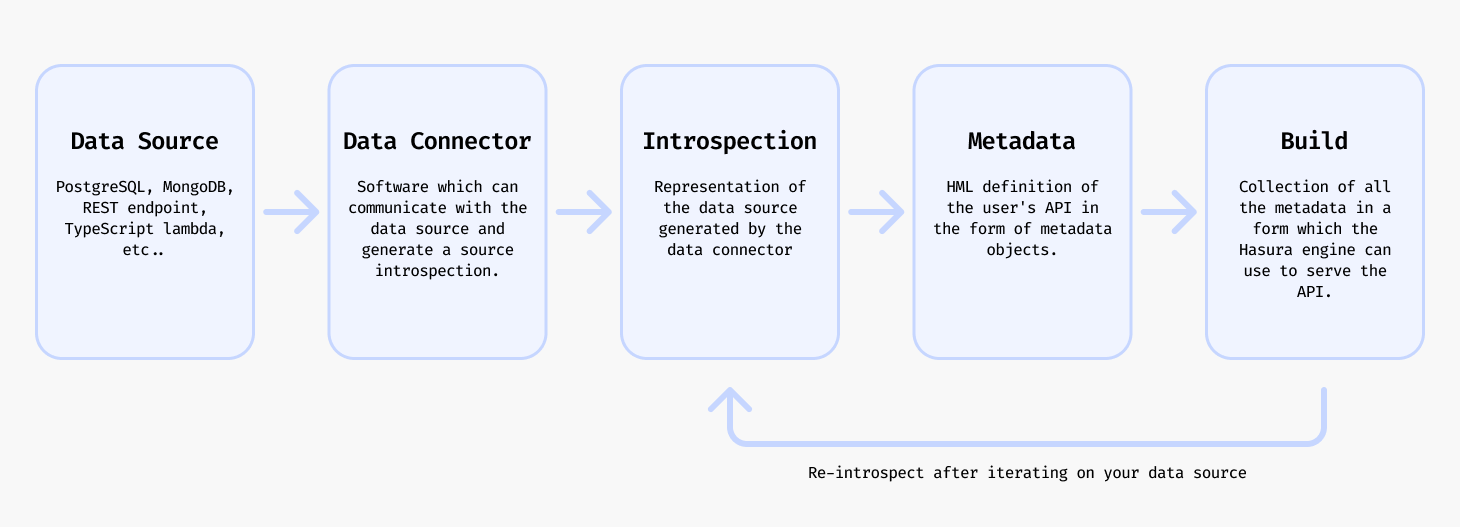
Creating models for your PromptQL supergraph involves the following steps:
- Identify data sources that you want PromptQL to intelligently interact with.
- Introspect your data source using the DDN CLI with the relevant data connector to fetch the entity resources.
- Add the model to your metadata with the DDN CLI.
- Create a build of your supergraph with the DDN CLI.
- Serve your build with the Hasura engine either locally or in the cloud.
- Interact with your data through PromptQL in a natural, conversational way.
Create a model
To add a model you will need to have a data connector already set up and connected to the data source. Follow the relevant tutorial for your data source in How to Build with PromptQL to get to that point.
From a source entity
ddn connector introspect <connector_name>
Whenever you update your data source, you can run the above command to fetch the latest resources.
ddn connector show-resources <connector_name>
This is an optional step and will output a list of resources that DDN discovered in your data source in the previous step.
ddn model add <connector_link_name> <collection_name>
Or you can optionally add all the models by specifying "*".
ddn model add <connector_link_name> "*"
This will add models with their accompanying metadata definitions to your metadata.
You can now build your supergraph, serve it, and begin having meaningful conversations with your data through PromptQL. With robust models in place, PromptQL can create dynamic query plans that accurately address your requests and provide deep insights into your data.
Note that the above CLI commands work without also adding the relevant subgraph to the command with the --subgraph
flag because this has been set in the CLI context. You can learn more about creating and switching contexts in the
CLI context section.
Via native query
You can use the query syntax of the underlying data source to create a native query and expose it as a model in your supergraph.
The process of adding a native query is more or less unique for each data connector as each data source by nature has its own syntax.
- PostgreSQL
- MongoDB
- ClickHouse
The process for adding a native query for PostgreSQL is:
- Create a new SQL file in your connector directory.
- Name the file with how you want to reference it in your supergraph API.
- Add the SQL for your native query to the file.
- Use the DDN CLI plugin for the PostgreSQL connector to add the native query to the connector's configuration eg:
ddn connector plugin \
  --connector subgraph_name/connector/connector_name/connector.yaml \
  -- native-operation create \
  --operation-path path/to/sql_file_name.sql \
  --kind query
- Introspect your PostgreSQL data connector to fetch the latest resources.
ddn connector introspect <connector_name>
- Show the found resources to see the new native query.
ddn connector show-resources <connector_name>
- Add the model for the native query.
ddn model add <connector_link_name> <model_name>
- Rebuild and serve your supergraph API.
Find out more about native queries for PostgreSQL here.
The process for adding a native query for MongoDB is:
- Create a new MongoDB aggregation pipeline which defines the native query in your connector's directory.
- Name the file with how you want to reference it in your supergraph API.
- Use the DDN CLI plugin for the MongoDB connector to add the aggregation pipeline to the connector's configuration eg:
ddn connector plugin \
  --connector subgraph_name/connector/connector_name/connector.yaml \
  -- native-query create path/to/aggregation_pipeline_filename.json \
  --collection collection_name
- Introspect your MongoDB data connector to fetch the latest resources.
ddn connector introspect <connector_name>
- Show the found resources to see the new native query.
ddn connector show-resources <connector_name>
- Add the model for the native query.
ddn model add <connector_link_name> <model_name>
- Rebuild and serve your supergraph API.
Find out more about native queries for MongoDB here.
The process for adding a native query for ClickHouse is:
- Create a new SQL file in your connector directory.
- Use ClickHouse parameter syntax in the SQL file to define arguments.
- Create a JSON configuration file in your connector directory specifying the SQL file path and the return type.
{
  "tables": {},
  "queries": {
    "Name": {
      "exposed_as": "collection",
      "file": "path/to/sql_file_name.sql",
      "return_type": {
        "kind": "definition",
        "columns": {
          "column_name": "column_type"
        }
      }
    }
  }
}
- Introspect your ClickHouse data connector to fetch the latest resources.
ddn connector introspect <connector_name>
- Show the found resources to see the new native query.
ddn connector show-resources <connector_name>
- Add the model for the native query.
ddn model add <connector_link_name> <model_name>
- Rebuild and serve your supergraph API.
Find out more about native queries for ClickHouse here.
Update a model
If you want to update your model to reflect a change that happened in the underlying data source you should first introspect to get the latest resources and then update the relevant model.
ddn connector introspect <connector_name>
ddn model update <connector_link_name> <model_name>
You will see an output which explains how new resources were added or updated in the model.
You can now build your supergraph, serve it, and continue interacting with your data using PromptQL, which will automatically adjust its query plans based on the updated model definitions.
You can also update the model by editing the metadata manually.
Extend a model
A model can be extended to enable PromptQL to understand and navigate relationships between different data entities.
For example, you can extend a model like Customers to also include related Orders data. This allows PromptQL to
answer questions like "Show me customer Jane Doe's recent orders" by understanding the relationship between customers
and orders.
Or you can add custom business logic to a model like Orders to compute and return the current currency conversion of
the total price, enabling PromptQL to provide real-time financial insights across different currencies.
The way this is done is via a Relationship. Read more about
creating relationships here.
Delete a model
ddn model remove users
In addition to removing the Model object itself, the DDN CLI will also remove the associated metadata definitions.
Reference
You can learn more about models in the metadata reference docs.